Spectra35 · Experimental tests
A 35-recipe palette for OpenPaper L, with Epdoptimize mapping, custom LUT passes, actual display comparisons and research limitations.
EXPERIMENTAL TESTS — custom firmware and LUT driver required
Spectra35 is a laboratory experiment, not a production feature or a manufacturer-specified panel mode. The palette does not make standard Spectra6 firmware accept 35 colors. Its output image contains recipe tokens that must be decoded and executed by a matching experimental driver. Do not send that image through the normal device-upload API.
The recipes are provisional. Panel lifetime, neutral grayscale, transfer between units and absolute Source/VCOM voltages are not qualified. Contact the project before trying custom drive waveforms.
What Spectra35 does
A normal Spectra6 update selects six native colors. Spectra35 combines a per-pixel native starting color with a sequence of custom waveforms to retain additional pigment states on the tested 13.3-inch OpenPaper L. Epdoptimize then dithers against a 35-entry appearance palette.
“35” counts recipe entries. It does not establish 35 independently distinguishable, stable colors on every panel. Some states are close together, and fine dither patterns can look different from large swatches. The experiment is separate from the earlier 16 image-code photo rendering, which used an ordinary refresh.
| Stage | What it contains |
|---|---|
| Appearance palette | Approximate camera-derived RGB values used for matching and dithering |
| Token image | One exact recipe ID per pixel, encoded as an RGB token |
| Recipe table | The native history, waveform bank and LUT associated with each ID |
| Write plan | One native preparation followed by four complete LUT/image passes |
The tested raster is 1600 × 1200, split across two controllers. Both reported 0x34C2; this identity check alone is not a guarantee that another panel is compatible. See the OpenPaper L panel guide for the bench specimen and the testbench setup.
Actual display comparison
Drag the divider over the right half of the lake photograph. The reference is a full native Spectra6 capture. The experimental capture keeps Spectra6 on the left and uses Spectra35 on the right. Both images show the same source coordinates. They are perspective-corrected camera photographs, not simulated palette previews.
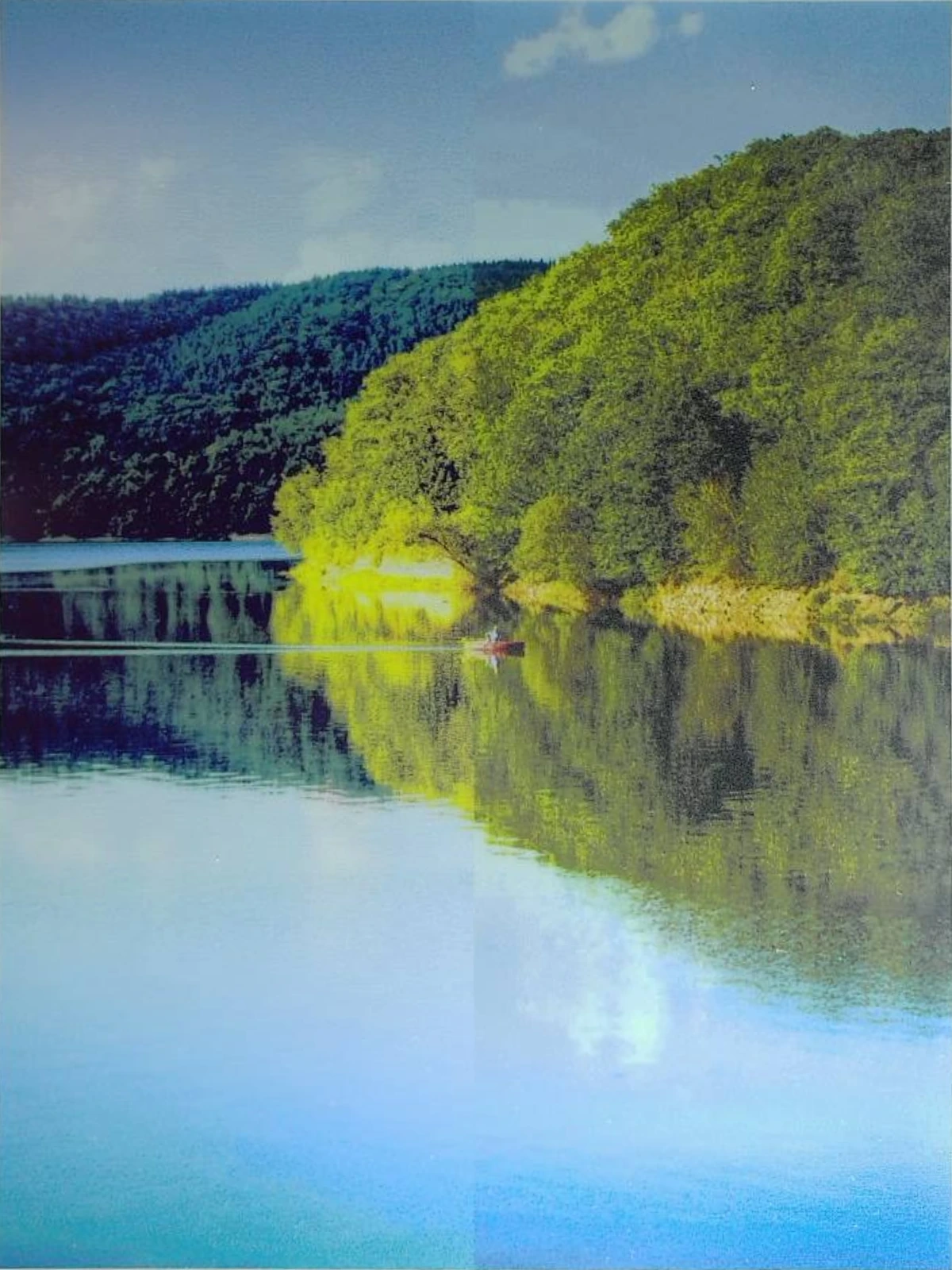
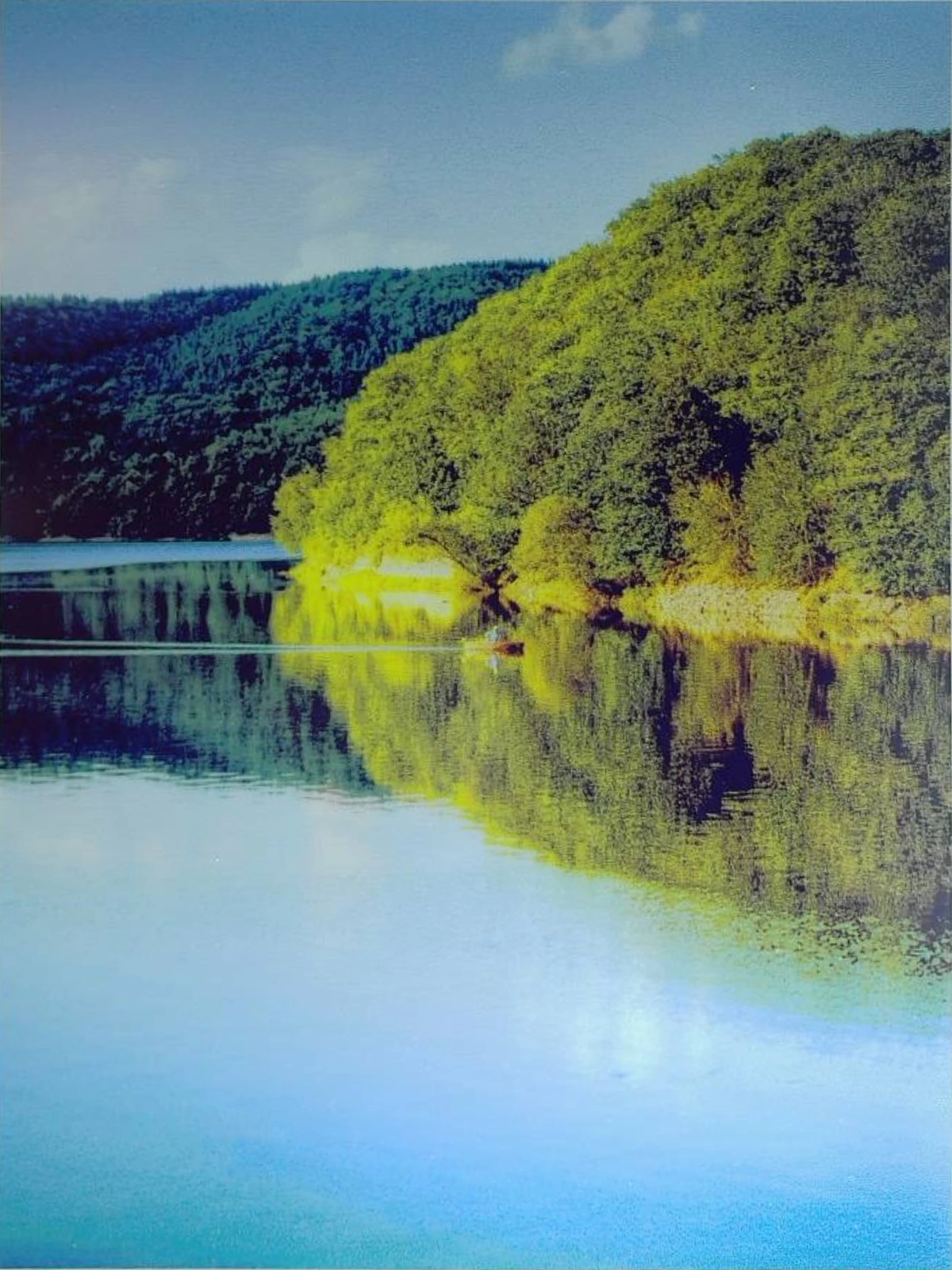
The later v3 input correction brought the lake's light reflections and blue water closer to the six-color reference. Other regions became slightly less close. The correction was also tried on flags, a building and the Geneva poster below. Pale pink, skin tones and neutral grays remain difficult. More palette entries did not produce a universal quality improvement.
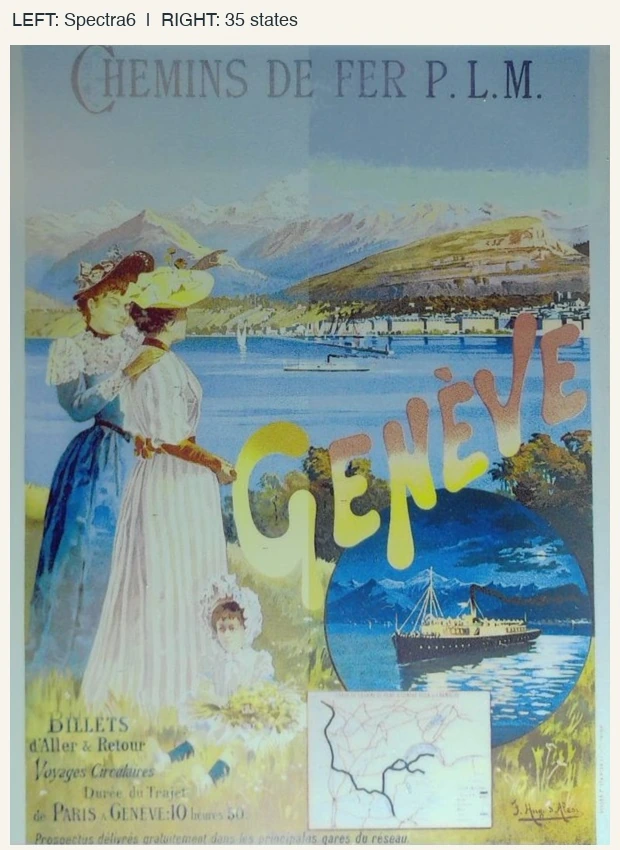
These later photo trials also use a linear-light adapter, gamut compression and a scene-tuned v3 correction. Those transforms are not built into the palette download or the generic example below. No additional camera color-correction matrix was applied to these displayed photographs. Reference-card changes between captures remain a source of uncertainty.
Download the experimental assets
- Appearance palette for Epdoptimize — JSON
- Recipe mapping — JSON
- Offline recipe kit — ZIP: palette, recipe/profile data, four exact 2048-byte LUT binaries, measurements, planner, instructions and SHA-256 manifest
- Compact test results — JSON
- Epdoptimize palette PR: proposed
spectra35ExperimentalPaletteexport andspectra35-experimentallookup key
The kit compiles files locally; it does not flash firmware or send anything to the panel. A production driver and ordinary API integration are not included. The downloadable JSON works as a custom palette with the tested Epdoptimize 1.4.1 API. The named export is proposed in the PR; do not assume it is available in an installed release yet.
1. Use appearance RGB for dithering
Each entry has two deliberately different values:
{ "name": "C04", "color": "#C44F45", "deviceColor": "#010003" }color is the approximate appearance of that red recipe. Epdoptimize uses it when choosing pixels and distributing error. deviceColor is recipe index 3, carried as RGB (1, 0, 3). It is not the red shown on the display and not a directly writable panel code.
This distinction also exists in Spectra6: its measured red can be dark and muted while its native export color is full RGB red. Spectra35 extends that mapping to recipe tokens, because more than one native refresh is needed.
- Recipe 0 · blackAppearance
#2D263EToken#010000 - Recipe 1 · whiteAppearance
#C4BEBDToken#010001 - Recipe 2 · C03Appearance
#DEC417Token#010002 - Recipe 3 · C04Appearance
#C44F45Token#010003 - Recipe 4 · C05Appearance
#2F72C7Token#010004 - Recipe 5 · C06Appearance
#6A9F7FToken#010005 - Recipe 6 · C07Appearance
#CAC0B3Token#010006 - Recipe 7 · C08Appearance
#AAB3B8Token#010007 - Recipe 8 · C09Appearance
#36A5C6Token#010008 - Recipe 9 · C10Appearance
#C39A99Token#010009 - Recipe 10 · C11Appearance
#D6B889Token#01000A - Recipe 11 · C12Appearance
#609C7CToken#01000B - Recipe 12 · C13Appearance
#B78A90Token#01000C - Recipe 13 · C14Appearance
#939950Token#01000D - Recipe 14 · C15Appearance
#285EA5Token#01000E - Recipe 15 · C16Appearance
#AAB26DToken#01000F - Recipe 16 · C17Appearance
#9B3936Token#010010 - Recipe 17 · C18Appearance
#20316CToken#010011 - Recipe 18 · C19Appearance
#394859Token#010012 - Recipe 19 · C20Appearance
#DD8442Token#010013 - Recipe 20 · C21Appearance
#458C83Token#010014 - Recipe 21 · C22Appearance
#815D71Token#010015 - Recipe 22 · C23Appearance
#67475FToken#010016 - Recipe 23 · C24Appearance
#8BAEC4Token#010017 - Recipe 24 · C25Appearance
#7DA37BToken#010018 - Recipe 25 · C26Appearance
#8C6475Token#010019 - Recipe 26 · C27Appearance
#78526AToken#01001A - Recipe 27 · C28Appearance
#D8624FToken#01001B - Recipe 28 · C29Appearance
#8FA471Token#01001C - Recipe 29 · C30Appearance
#D67148Token#01001D - Recipe 30 · C31Appearance
#CAB722Token#01001E - Recipe 31 · C32Appearance
#4C9E8CToken#01001F - Recipe 32 · C33Appearance
#96A9B6Token#010020 - Recipe 33 · C34Appearance
#B17D82Token#010021 - Recipe 34 · C35Appearance
#3893D5Token#010022
The source palette SHA-256 is c829d104627fcf7e7666ef24b4733809fdeb0947a95900e6df537b3850bf26c0. Values retain the measured recipe order. Names such as black and white identify reference states, not ideal RGB endpoints. Tokens run from #010000 through #010022, corresponding to indices 0–34.
2. Generate a preview and an exact token PNG
Fit or rotate the original to 1600 × 1200 before dithering. The example uses four separate canvases: input, adjusted, preview and tokens. It uses automatic dither selection with fixed neutral adjustments, rather than the later scene-tuned v3 preprocessing.
import {
  applyImageAdjustments,
  ditherCanvas,
  replaceColors,
  suggestCanvasDitherOptions,
} from "epdoptimize";

const response = await fetch("/panels/spectra35/palette.json");
if (!response.ok) throw new Error("Could not load Spectra35 palette");
const palette = await response.json();
const automatic = suggestCanvasDitherOptions(input, palette, { intent: "natural" });
const options = {
  ...automatic.ditherOptions,
  palette,
  processingEngine: "js",
  calibrate: true,
  toneMapping: { mode: "off" },
  clarity: { amount: 0 },
  dynamicRangeCompression: { mode: "display", strength: 1 },
  levelCompression: { mode: "off" },
  paperNormalization: { mode: "off" },
};
await applyImageAdjustments(input, adjusted, options);
await ditherCanvas(adjusted, preview, options);
replaceColors(preview, tokens, palette);
// Export tokens as an opaque, lossless PNG for the offline planner.
The preview uses appearance colors. The token PNG will look almost black because every pixel is an ID near #010000. Do not resize, interpolate, JPEG-compress, color-convert or re-dither it after replacement. Unknown or transparent pixels must be rejected, not mapped to the nearest recipe.
For uniform fields or an undithered ramp, set ditheringType: "quantizationOnly". This chooses among the existing states; it does not create a continuously smooth color space.
3. Compile the five-pass plan
Unpack the recipe kit, create an environment and compile the exact token image:
python3 -m venv .venv
. .venv/bin/activate
python -m pip install -r requirements.txt
python compile_plan.py tokens.png new-plan
The output contains indices.png and passes/plan.json, five image streams and four LUT binaries. Existing output directories are rejected. This planner retains the full image and all four measured LUT passes even if only a few recipes are used. It does not insert a color strip.
| Pass | Action |
|---|---|
| 0 | Prepare every pixel using its recipe's native Spectra6 history |
| 1–4 | Upload the corresponding complete 2048-byte LUT and the exact bank-selection mask, in the recorded order |
A mask value selects a waveform bank; the final color also depends on pigment history. The full measured order is part of the palette definition. A recipe index is not a four-bit native pixel code.
4. Execute only with a matching experimental driver
The ZIP is an offline adapter, not a stock-firmware upload tool. Its transport files rotate the logical raster into two 600 × 1600 controller images, pack two four-bit selections per byte and compress 100 blocks per controller. Each block decodes to 4800 bytes and carries a little-endian 16-bit compressed length. These are bench transport files; other drivers must adapt them explicitly.
Before each refresh, check the complete LUT SHA-256, transport SHA-256 and both controller raster hashes in the plan. Require verified staging and natural BUSY completion for power-on, refresh and power-off. A rejected transfer must not trigger refresh. Inspect saved state before retrying; if the starting pigment history is uncertain, prepare a fresh complete run.
The bench needed paced UART transfers and temporary camera-stream pauses to avoid USB/UART data loss. Packet sizing is a transport detail, not reduced image bit depth. It does not change the 35 recipe values. The later linear-light image adapter does round to 8 bits per channel separately; this can coarsen dark input differences.
During a split comparison, inactive masks use bank 0 / Source0. Source0 is an experimental hold candidate, not electrically verified HiZ. Keeping that mask unchanged does not prove the other half is optically unaffected. Compare unchanged regions and the reference card before and after the custom passes.
What is confirmed, provisional and still missing
| Status | Finding |
|---|---|
| Confirmed on the test unit | Exact token decoding; full 2048-byte LUT uploads; five ordered passes with checked raster/LUT hashes and natural BUSY completion |
| Confirmed observation | Fine 1-, 2- and 4-pixel mixtures can differ from uniform swatches; a solid-field palette alone does not predict every dither texture |
| Provisional | Camera-derived appearance RGB and extra retained states; two fresh chart builds and both halves were sampled, with position and repeat variation retained as uncertainty |
| Provisional | Improvements on selected photographs and colors; the v3 correction was tuned on the lake, and did not generalize cleanly to every motif |
| Open | Consistently neutral skin tones and monochrome photos; at least 16 useful neutral grays; long-term drift and endurance; transfer between panel units |
| Open | Absolute Source and VCOM voltages, measured with suitable instruments; Source0 high-impedance behavior; a production firmware/API integration |
Palette measurements used an in-frame reference card, fixed camera settings and disabled sharpening. They are approximate camera RGB estimates, not spectrophotometer measurements or an ICC profile. Later photos were captured separately; lighting, camera startup transients and geometry still affect comparisons.
Build times
Recent split builds took approximately 256 s (lake), 274 s (flags), 329 s (building) and 315 s (poster). These times include staging, cooldowns and an intermediate capture, but exclude the final capture/archive overhead. The earlier 120-second photo target was not met. These results do not claim fast full-color animation or a flash-free native preparation.